
Posted on 24, April, 2025
Last Modified on 05, May, 2025
As businesses and public services strive to enhance customer experience and operational efficiency, digital kiosks have carved out a vital role—streamlining processes, reducing wait times, and offering around-the-clock accessibility. Their growing presence signals a broader shift toward automation and user empowerment in both commercial and civic spaces.
In This Article (jump to a section)
Introduction: What is a Kiosk?
Floor-standing kiosks are digitally enhanced terminals designed to provide users with information, services, or facilitate transactions in a variety of public spaces. Typically equipped with a touchscreen interface, kiosks allow individuals to access information, browse products, or complete other tasks without needing direct human interaction.
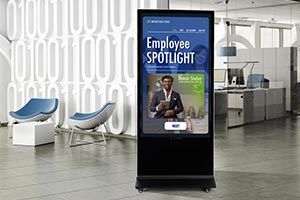 Floor-standing kiosks are digitally enhanced terminals designed to provide users with information, services, or facilitate transactions in a variety of public spaces. Typically equipped with a touchscreen interface, kiosks allow individuals to access information, browse products, or complete other tasks without needing direct human interaction.
The concept of a digital kiosk emerged in the early 1990s, initially as simple information terminals in places like airports and shopping malls. Over time, with advancements in technology, these kiosks evolved to include features such as digital payment processing, interactive maps, and even facial recognition. Today, floor-standing kiosks are commonly seen in lobbies, retail stores, transportation hubs, healthcare facilities, and trade show venues, where they offer convenience, streamline services, and enhance customer experiences. The continued growth of digital technology and user demand for self-service options continues to drive the evolution of these versatile machines, making them a critical tool in the modern digital landscape.
What are the Different Types of Kiosks?
1. Information Kiosks

Purpose: Provide directions, maps, or general info.
Common Locations: Airports, lobbies, malls, museums, campuses, city centers.
Industry Examples: Floor standing kiosks help visitors with wayfinding, restroom locations, or dining options. In airports and train stations, kiosks provide real-time travel information, such as flight departures, gate numbers, or platform changes. Museums and cultural centers use digital kiosks to display exhibit locations, provide details and historical context, and offer multilingual content for international visitors. City centers may also feature digital wayfinding kiosks that display maps, nearby attractions, public transport routes, and event listings.
2. Self-Service/Interactive Kiosks

Purpose: Perform tasks like check-ins, website browsing, and interactive learning.
Common Locations: Hotels, medical practices, events, and schools.
Industry Examples: In the hospitality sector, hotels use floor-standing and countertop digital kiosks to streamline check-ins and provide guests with quick access to local information and services. Healthcare facilities rely on them for patient registration, appointment scheduling, and wayfinding, improving both efficiency and privacy. At outdoor festivals and public events, kiosks serve as ticketing stations, information hubs, and interactive maps that enhance visitor experiences. In education, interactive kiosks are increasingly used for self-guided learning, campus navigation, and digital content access.
3. Charging Kiosks

Purpose: Offer free courtesy charging for personal devices.
Common Locations: Airports, trade shows, waiting rooms, and libraries.
Industry Examples: Charge kiosks provide free courtesy charging with USB ports and/or wireless charging pads for mobile devices. Some are combined with internet access features, such as free public Wi-Fi or touchscreen web browsing. In airports, charging kiosks help travelers stay connected while waiting for flights. Trade shows like to pepper kiosks around the convention floor for visitor convenience. And, any place where people have to wait for a service is a perfect fit for a charge station - waiting rooms like those found at medical practices, repair shops, DMVs, immigration bureaus, etc.
4. Promotional Kiosks

Purpose: Showcase marketing and branding initiatives for businesses.
Common Locations: Trade shows, casinos, dealerships, and retail stores.
Industry Examples: In the retail sector, digital kiosks serve as dynamic hubs for both customer engagement and brand amplification. Equipped with vivid Direct View LED graphics and eye-catching video streaming capabilities, these sleek displays command attention and create immersive shopping experiences. Retailers and dealerships leverage them to showcase new collections or inventory, deliver targeted promotions, and reinforce brand identity in real-time. Portable displays, typically used at trade shows and events, exploit everything digital kiosks have to offer in order to not only attract the attention of visitors, but also to present their company in the most professional way possible.
How do Digital Kiosks Work?

1. Non-Touch Kiosks:
These provide engaging and informative content without requiring users to physically touch a screen or buttons. Simply designed to be looked at, non-touch kiosks display news and weather feeds, times & schedules, looped video and/or slides, upcoming events, and other public service announcements. Perhaps most importantly, these contactless systems help enhance public health safety—especially in high-traffic areas for those who prefer not to touch shared surfaces.

2. Interactive Kiosks:
Self-service terminals let users engage with the digital content or complete tasks via a user-friendly interface like touchscreens, keyboards, or other input devices. Touchscreen kiosks work by offering a variety of options, such as browsing information, placing orders, checking in for appointments, or making payments. People interact by selecting menu items, entering data, or navigating through options on the screen. The interaction is often intuitive, guiding users through a series of steps with visual cues, buttons, and prompts. These kiosks enhance user experience by offering convenience, reducing wait times, and providing access to services without the need for staff intervention.
3. Content Management System Software (CMS):

Digital kiosks often rely on specialized CMS software to control, update, and organize the content displayed on their screens. There are several types of platforms, including web-based CMS, proprietary kiosk CMS, and enterprise digital signage CMS. Web-based CMS platforms offer remote management of content through a browser, enabling administrators to update text, images, videos, or interactive menus in real-time across multiple kiosks. Proprietary kiosk CMS software is often tailored to specific industries—like healthcare, retail, or hospitality—and includes features such as scheduling, user analytics, and device monitoring. Enterprise digital signage CMS solutions are designed for large-scale deployments, integrating with databases, APIs, and external systems for dynamic content that displays travel schedules or inventory levels. Users don’t interact with the CMS directly—instead, they engage with the interface and content that the CMS delivers, such as touchscreen menus, service forms, or multimedia displays. Behind the scenes, kiosk software and CMS ensure the display delivers accurate, engaging, and up-to-date information in a smooth, user-friendly format.
What are the Benefits of Kiosks for Businesses?
1. Advertising Power:
The best kiosks for retail applications offer a powerful blend of high visibility and strategic marketing that makes them an increasingly effective advertising tool across industries. Located in high-traffic areas like shopping centers, airports, and public transit hubs, the advertising power of digital kiosks extends well beyond static printed signs with vibrant, dynamic displays. Their real strength lies in adaptive advertising—kiosks can display content tailored to the time of day, weather, location, and user behavior, increasing relevance and engagement. With their ability to combine eye-catching visuals, real-time adaptability, and data-driven targeting, digital kiosks represent a smart, scalable advertising solution in an increasingly digital-first world.
2. Enhanced Customer Activity:

The effectiveness of interactivity leads to increased consumer engagement and higher conversion rates, transforming static information points into dynamic hubs. In retail environments, store fixtures featuring merchandising shelves with digital screens are boosting customer satisfaction by offering products, sales promotions, and loyalty programs. Businesses are leveraging them to improve service efficiency, offer self-service options, and reduce operational bottlenecks. Meanwhile, in public spaces like airports, museums, and transit stations, interactive kiosks are enriching user experiences through easy access to information, directions, and services. This shift toward interactivity positively affects overall system efficiency and customer retention.
3. Reduced Labor Costs:
Digital kiosks play a pivotal role in reducing labor and employee costs across various industries by automating routine tasks and optimizing workforce allocation. For example in the food service sector, savings are attributed to kiosks handling order placements, allowing staff to focus on food preparation and customer service. Beyond direct labor savings, kiosks also minimize training costs by providing consistent and user-friendly interfaces, reducing the need for extensive employee onboarding. Digital kiosks can operate during peak and non-peak hours without the need for temporary staff, further cutting labor expenses.
4. Improved Shopping Experience:

Digital kiosks enhance the retail customer experience by combining interactive touchscreens, user-friendly interfaces, and targeted promotional strategies to create a seamless and engaging journey. Touchscreens allow users to easily navigate menus, browse products, or access services with intuitive gestures, making the interaction quick and satisfying. User-friendly interfaces, designed with clarity and simplicity in mind, reduce confusion and empower customers to complete tasks independently—whether it's placing an order, checking in, or finding information. Additionally, integrated promotional strategies such as dynamic ads, personalized recommendations, and limited-time offers can be delivered in real time, capturing customer attention and driving engagement. Together, these features make digital kiosks not just functional tools, but impactful touchpoints that elevate the overall customer experience.
5. Increased Accessibility:

Displaying kiosks in the great outdoors extends their reach and potential for passersby to take notice. The integration of multilingual support in kiosks ensures accessibility for a diverse customer base. By offering language options, kiosks cater to non-native speakers, improving communication and reducing the likelihood of errors in orders or transactions. This not only fosters customer satisfaction but also broadens the reach of businesses to a more global audience. Additionally, features like voice navigation and audio assistance further improve accessibility, making digital kiosks user-friendly for individuals with visual impairments or those who prefer auditory guidance. Overall, digital kiosks exemplify how technology can improve service efficiency and customer satisfaction through convenience and inclusivity.
Conclusion: What is the Future of Kiosk Technology?
The future of digital kiosks is poised for significant transformation, driven by advancements in artificial intelligence (AI) and voice-enabled technologies. AI integration is enhancing kiosk capabilities, enabling features such as real-time speech recognition, personalized recommendations, and predictive analytics which collectively improve customer engagement and operational efficiency. This growth reflects the increasing adoption of AI-driven kiosks across various sectors, including retail, healthcare, and hospitality. Voice-enabled kiosks are also gaining traction, with advancements in natural language processing allowing for more intuitive and accessible interactions, catering to a diverse customer base. The widespread adoption of digital kiosks is marking a significant step in the ongoing digital business transformation.
Updating your cart